# 관리자 페이지에서 폴더를 삭제하는 방법

### 개요 <a href="#a03" id="a03"></a>

이 매뉴얼에서는 관리 페이지의 '공유 설정' > 'Shared Box' 메뉴에서 폴더를 삭제하는 방법에 대해 설명합니다.

***

### 제한·보충사항 <a href="#a04" id="a04"></a>

* 관리자 권한이 부여된 사용자는 관리자 페이지에서 '공유 설정' 메뉴를 사용할 수 있습니다.
* 폴더를 일괄로 삭제할 수 없습니다.
* 사용자 페이지에서는 제1계층의 폴더를 삭제할 때 'DELETE'를 입력하지만, 관리 페이지에서는 모든 계층의 폴더를 삭제할 때 'DELETE'를 입력해야 합니다.
* 'DirectCloud-CONNECT'를 사용할 수 있는 경우, 관리 페이지의 '공유 설정' > 'Connect 관리' 메뉴가 표시됩니다.
* 'DirectCloud-SHIELD DLP'를 계약한 경우, 관리 페이지의 '공유 설정' > 'DLP 관리' 메뉴가 표시됩니다.
* 'Warm Storage'를 계약한 경우, 관리 페이지의 '공유 설정' > 'Warm Storage 관리' 메뉴가 표시됩니다.
* Warm Storage에서 폴더 삭제 등의 작업을 수행할 때의 사양에 대해서는 [사용자 페이지에서 고스트(Ghost)를 조작하는 방법](https://help.directcloud.net/user_manual/warm-storage/use_ghost)을 참고해 주십시오.

***

### 절차 <a href="#a05" id="a05"></a>

{% hint style="warning" %}
**폴더 삭제**
{% endhint %}

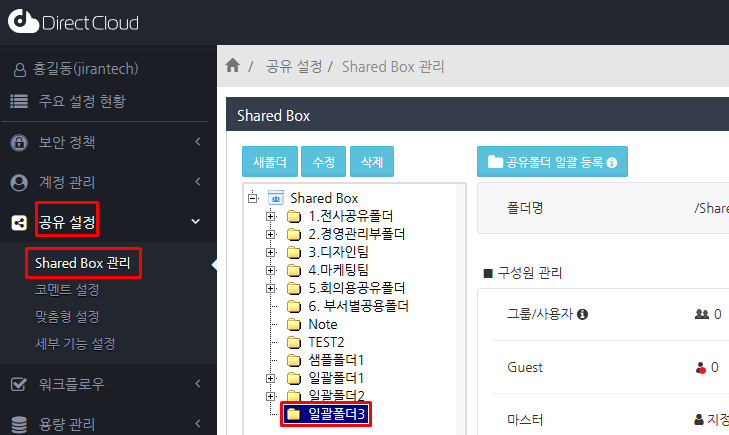
1. '공유 설정' > 'Shared Box 관리' 메뉴를 선택하고 Shared Box 폴더 트리에서 삭제할 폴더를 선택합니다.

<figure><img src="https://1610041171-files.gitbook.io/~/files/v0/b/gitbook-x-prod.appspot.com/o/spaces%2FFRc8hBWqHCHYh3E0AhFb%2Fuploads%2FLl10sCIxg5gvkvZ0Ezqy%2Fimage.png?alt=media&#x26;token=4d85ce73-b993-465f-88e6-bd948e7522ec" alt=""><figcaption></figcaption></figure>

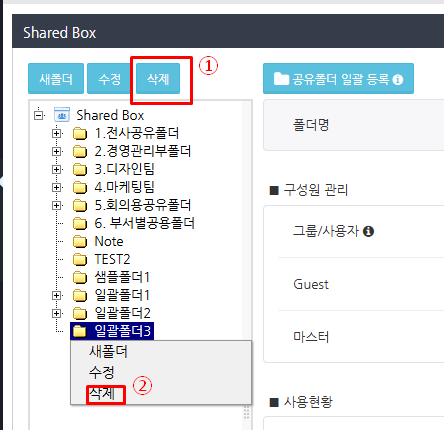
2. 다음 방법 중 하나로 삭제 확인 화면을 표시합니다.

❶ 삭제할 폴더를 선택하고 왼쪽 상단의 '삭제'버튼을 클릭합니다.\
❷ 삭제할 폴더를 마우스 오른쪽 버튼으로 클릭하고 표시된 메뉴에서 '삭제'를 클릭하십시오.

<figure><img src="https://1610041171-files.gitbook.io/~/files/v0/b/gitbook-x-prod.appspot.com/o/spaces%2FFRc8hBWqHCHYh3E0AhFb%2Fuploads%2F1vjd9raZ1kXNxvqkJ4b4%2Fimage.png?alt=media&#x26;token=564ebf34-5958-45dc-934d-b8a76782c29b" alt=""><figcaption></figcaption></figure>

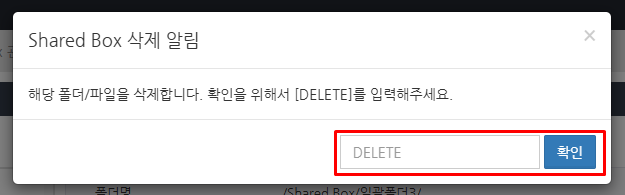
3. 확인 화면에서 DELETE를 입력하고 확인 버튼을 클릭합니다.\
   폴더가 삭제됩니다.

<figure><img src="https://1610041171-files.gitbook.io/~/files/v0/b/gitbook-x-prod.appspot.com/o/spaces%2FFRc8hBWqHCHYh3E0AhFb%2Fuploads%2F6IvGNI1Sljljh3y8WlZN%2Fimage.png?alt=media&#x26;token=2cc9b617-cc16-4e6e-9473-d53d3d606e04" alt=""><figcaption></figcaption></figure>

{% hint style="warning" %}
**삭제된 폴더 확인**
{% endhint %}

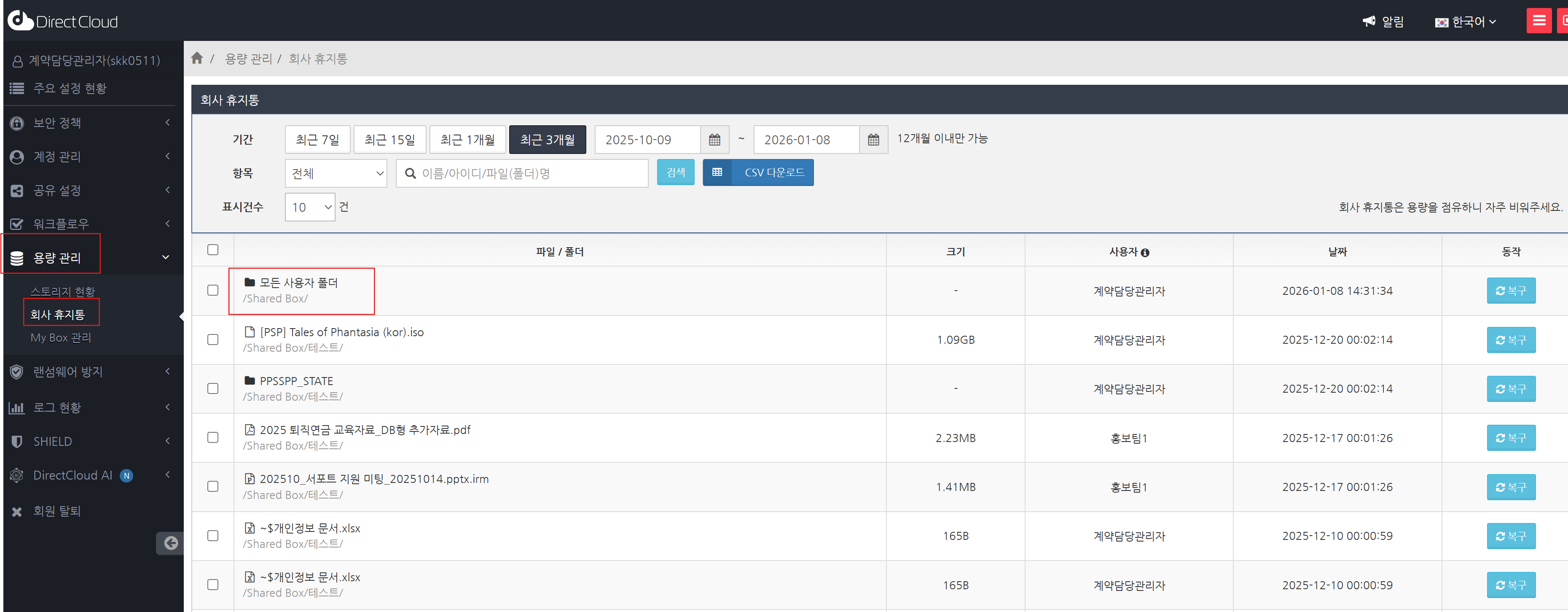
삭제된 폴더는 아래 절차에 따라 확인할 수 있습니다.

1. '용량관리' > '회사 휴지통' 메뉴를 선택한 후, 삭제된 폴더를 확인합니다.
<figure><img src="https://1610041171-files.gitbook.io/~/files/v0/b/gitbook-x-prod.appspot.com/o/spaces%2FFRc8hBWqHCHYh3E0AhFb%2Fuploads%2FGK01V00TgHz70pS5AKtQ%2Fimage.png?alt=media&#x26;token=55acc16d-95d5-4dff-a9b8-a444a7134b53" alt=""><figcaption></figcaption></figure>


---

# Agent Instructions: Querying This Documentation

If you need additional information that is not directly available in this page, you can query the documentation dynamically by asking a question.

Perform an HTTP GET request on the current page URL with the `ask` query parameter:

```
GET https://help.directcloud.net/admin_manual/folder/delete_folder.md?ask=<question>
```

The question should be specific, self-contained, and written in natural language.
The response will contain a direct answer to the question and relevant excerpts and sources from the documentation.

Use this mechanism when the answer is not explicitly present in the current page, you need clarification or additional context, or you want to retrieve related documentation sections.